

Date input fields can optionally display a popup calendar, based on the iEditStyle field of the SFTMASK_CONTROL structure (SFTMASK_EDITCALENDARDROPDOWN). Pressing the Alt+Down arrow keys, pressing F4 (see fAllowF4) or clicking on the drop down button will display the popup calendar. A modern calendar drop down button can be selected using the fDDButtonCalendar field. The calendar can also be made visible automatically every time the control receives the input focus by using the calfDropOnFocus field.
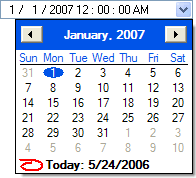
Once the popup calendar is displayed, the user can select a particular date (see Keyboard & Mouse Interface for details).
The user can press Enter after selecting a date, which closes the popup calendar and enters the date into the masked edit control. Clicking outside of the calendar window has the same effect. A single click on a date can be made to close the calendar using the calfSingleClickClose field.
By pressing the Escape key, the user can abandon any selection and the contents of the masked edit control are unchanged.
The calendar display can be customized using the calendar fields of the SFTMASK_CONTROL structure: the first day of the week (caliFirstDay), the valid date range (calFirstDate, calLastDate), whether today's date is shown and circled (calfShowToday, calfCircleToday), week numbers (calfWeekNumbers) and the calendar colors (calendarColorBg, calendarColorMonthBg, calendarColorMonthFg, calendarColorOtherFg, calendarColorTitleBg, calendarColorTitleFg).
The NM_SFTMASK_UPDATEMONTH notification is sent every time a new month is displayed, giving the application the opportunity to highlight certain dates using the SetBoldDate function.
When entering a date with a 2-digit year, the calCenturyBreak field defines the century break used to expand the year; the calAdjust4DigitYear field controls whether a 4-digit year is adjusted automatically.
The drop down button can be disabled using the fLockedDropDown field. The dropdown button supports hot-tracking (see the fHotTrack field).
The Rollup function can be used to close the popup calendar, popup calculator and autocomplete window.
The popup calendar follows the control's dark mode and high contrast rendering.
See Also Edit Masks | Popup Calculator | SetBoldDate | SFTMASK_FIRSTDAY Constants | SFTMASK_CONTROL

 On
On Off
Off