

By defining an edit mask (lpszMask field of the SFTMASK_CONTROL structure), extensive input validation and formatting is available. The mask string is composed of literal characters and of tokens and subtokens defining each input field. See Edit Masks for the complete token reference.
A number of different input fields can be defined using tokens. Literal characters can also be added to the mask. These characters are displayed by the masked edit control, but the user cannot modify them. Only input fields allow data entry.
Both input fields and literal characters are displayed using the font defined using the WM_SETFONT message. Input fields can be underlined using the fPromptUnderline and fPromptUnderlineNoFocus fields.
Input fields use the colors defined using the colorBg and colorFg fields. Literal characters are displayed using the colors defined using the colorBg and colorMaskFg fields.
Samples
Visual Feedback
Formatted Text - Valid Contents

This example allows entry of a telephone number. Area codes cannot start with a "0", only the digits 1 through 9 are acceptable in the first position.
SFTMASK_CONTROL Ctl;
Ctl.cbSize = sizeof(SFTMASK_CONTROL);
SftMask_GetControlInfo(hwndCtl, &Ctl);
Ctl.lpszMask = (LPTSTR) TEXT("\\([M1-9]##\\) ###\\-####");
SftMask_SetControlInfo(hwndCtl, &Ctl);
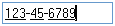
This example allows entry of a social security number.
SFTMASK_CONTROL Ctl;
Ctl.cbSize = sizeof(SFTMASK_CONTROL);
SftMask_GetControlInfo(hwndCtl, &Ctl);
Ctl.lpszMask = (LPTSTR) TEXT("###\\-##\\-####");
SftMask_SetControlInfo(hwndCtl, &Ctl);
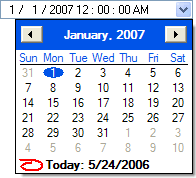
One control is used to enter the date and time of an event. A popup calendar is available.
SFTMASK_CONTROL Ctl;
Ctl.cbSize = sizeof(SFTMASK_CONTROL);
SftMask_GetControlInfo(hwndCtl, &Ctl);
Ctl.lpszMask = (LPTSTR) TEXT("$D $T");
Ctl.fAutoAdvance = TRUE;
Ctl.fTabAdvance = TRUE;
Ctl.iEditStyle = SFTMASK_EDITCALENDARDROPDOWN;
SftMask_SetControlInfo(hwndCtl, &Ctl);

// set the initial date/time
DATE Dt;
SYSTEMTIME SysTime = { 1976, 7, 0, 4, 10, 0, 0, 0 };
SystemTimeToVariantTime(&SysTime, &Dt);
SftMask_Contents_SetDateTime(hwndCtl, &Dt);

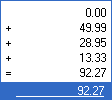
This example shows entry of a currency value with a popup calculator and up-down buttons (spin buttons). The label "|" displays the currency symbol defined by the user's locale, placed before or after the amount according to the locale's currency format. Because this mask has no minimum/maximum range, the up/down buttons change the value only if the application handles NM_SFTMASK_UPDOWNPRESS (see Up/Down Buttons).
SFTMASK_CONTROL Ctl;
Ctl.cbSize = sizeof(SFTMASK_CONTROL);
SftMask_GetControlInfo(hwndCtl, &Ctl);
Ctl.iAlignment = ES_RIGHT;
Ctl.lpszMask = (LPTSTR) TEXT("$^C-,8.2");
Ctl.lpszLabel = (LPTSTR) TEXT("|");
Ctl.iLabelPosition = SFTMASK_LABELPOSITION_AUTO;
Ctl.iEditStyle = SFTMASK_EDITUPDOWN;
SftMask_SetControlInfo(hwndCtl, &Ctl);

This example allows entry of a percentage value (0-100) with up-down buttons (spin buttons).
SFTMASK_CONTROL Ctl;
Ctl.cbSize = sizeof(SFTMASK_CONTROL);
SftMask_GetControlInfo(hwndCtl, &Ctl);
Ctl.iAlignment = ES_RIGHT;
Ctl.lpszMask = (LPTSTR) TEXT("$^3(0,100)");
Ctl.iEditStyle = SFTMASK_EDITUPDOWN;
Ctl.lpszLabel = (LPTSTR) TEXT("%");
Ctl.iLabelPosition = SFTMASK_LABELPOSITION_RIGHT;
SftMask_SetControlInfo(hwndCtl, &Ctl);

This example allows entry of an IP address, consisting of 4 input fields. As the user enters data, the Tab key or "." can be used to move to the next field.
SFTMASK_CONTROL Ctl;
Ctl.cbSize = sizeof(SFTMASK_CONTROL);
SftMask_GetControlInfo(hwndCtl, &Ctl);
Ctl.iEditStyle = SFTMASK_EDITUPDOWN;
Ctl.lpszMask = (LPTSTR) TEXT("$I^03(0,255)\\.$I^03(0,255)\\.$I^03(0,255)\\.$I^03(0,255)");
Ctl.fAutoAdvance = TRUE;
Ctl.fTabAdvance = TRUE;
SftMask_SetControlInfo(hwndCtl, &Ctl);


It is possible to provide visual feedback to the user whether the current data entered is valid. In the following example, a telephone number is to be entered. The control's contents are displayed in red until the entire telephone number has been entered. Once the contents are valid, they are displayed using the default window background and foreground colors. The SFTMASKN_CHANGE notification is sent to the parent window whenever the contents change.
case SFTMASKN_CHANGE: {
    SFTMASK_CONTROL Ctl;
    Ctl.cbSize = sizeof(SFTMASK_CONTROL);
    SftMask_GetControlInfo(hwndCtl, &Ctl);
    if (SftMask_IsValid(hwndCtl)) {
        Ctl.colorBg = SFTMASK_NOCOLOR;    // default colors
        Ctl.colorFg = SFTMASK_NOCOLOR;
        Ctl.colorMaskFg = SFTMASK_NOCOLOR;
    } else {
        Ctl.colorBg = RGB(255,255,255);
        Ctl.colorFg = RGB(255,0,0);
        Ctl.colorMaskFg = RGB(255,0,0);
    }
    SftMask_SetControlInfo(hwndCtl, &Ctl);
    break;
 }
For a more noticeable effect, the colorBgInvalid and colorFgInvalid fields can be used instead, which are applied automatically while the contents are invalid.
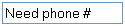
The lpszFormattedText field is used to specify the control's displayed text while the control does not have the input focus. This could be used for mandatory fields to highlight that the information has not yet been entered. In the following example, a telephone number is to be entered. As long as the control does not have the input focus and the telephone number has not yet been completely entered, the text "Need phone #" is displayed.
If the mouse cursor moves over the control, the input data is displayed, even if the control does not have the input focus.
case SFTMASKN_CHANGE: {
    SFTMASK_CONTROL Ctl;
    Ctl.cbSize = sizeof(SFTMASK_CONTROL);
    SftMask_GetControlInfo(hwndCtl, &Ctl);
    if (SftMask_IsValid(hwndCtl))
        Ctl.lpszFormattedText = (LPTSTR) TEXT("");
    else
        Ctl.lpszFormattedText = (LPTSTR) TEXT("Need phone #");
    SftMask_SetControlInfo(hwndCtl, &Ctl);
    break;
 }
See Also Edit Masks | Simple Edit Control | Input Validation | SFTMASK_CONTROL

 On
On Off
Off