

A masked edit control can be defined to accept ellipse button clicks. An ellipse button is only displayed if the iEditStyle field of the SFTMASK_CONTROL structure is set to SFTMASK_EDITELLIPSE.
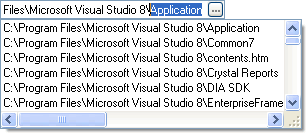
When the user clicks on the ellipse button, the SFTMASKN_ELLIPSECLICKED notification is sent to the parent window. This notification has no built-in response. An application must implement a response for the ellipse button to perform an action, such as displaying a file selection dialog, or opening the autocomplete suggestion list using the AutoCompleteRefresh function:
case SFTMASKN_ELLIPSECLICKED:
    SftMask_AutoComplete_Refresh(hwndCtl); // open the suggestion dropdown
    break;
The ellipse button can be disabled using the fLockedEllipse field.
Ellipse buttons support hot-tracking (see the fHotTrack field).
See Also AutoComplete | SFTMASK_EDIT Constants | Notifications

 On
On Off
Off