

The SftBox.Style property defines the style of the combo box (see BoxStyleEnum):
| Style | Description |
|---|---|
| BoxStyleEnum.Simple | An edit field with the list always shown below it. The height of the control defines the height of the list. |
| BoxStyleEnum.DropDown (default) | An edit field with a dropdown button that shows the list as a dropdown. The user can type text that is not in the list. |
| BoxStyleEnum.DropDownList | The selected item, which cannot be edited, with a dropdown button. Typing selects the item whose text starts with the characters typed within a second. |
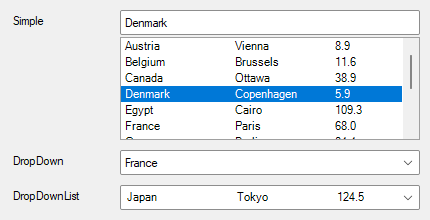
A DropDownList combo box shows the selected item as the list shows it, with all its columns and images (SelectionDisplayEnum.Item, the default), or only the text of its display column (SelectionDisplayEnum.Text), as defined by the SftBox.SelectionDisplay property.

The height of a DropDown or DropDownList combo box follows its font. The SftBox.FieldHeight property returns the height that fits the font, and the GetPreferredSize method the size that fits the font and the list.

 On
 Off