

Expand/collapse buttons are optional buttons displayed in the hierarchy column (see ColumnClass.ShowHierarchy) to allow users to expand and collapse parts of the list by clicking a button. They are shown as defined by the ListClass.ShowExpandCollapseButtons property, for example for items on all levels (ShowExpandCollapseButtonsEnum.AllLevels). The button images can be modified using the ListClass.Buttons property and are shared between all items.
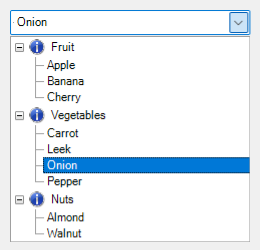
Expand/collapse buttons for individual items can be defined using the ItemClass.ExpandCollapseButton property.
A click on an expand/collapse button in the dropdown expands or collapses the item without choosing it and without closing the dropdown.

 On
 Off