

The list of a combo box can show the rows of a data source as its items. The SftBox.DataSource property defines the data source: a list (IList, such as an array, a List or a BindingList), a list source (IListSource, such as a DataTable or DataSet) or a BindingSource. When the data source holds several lists, such as the tables of a DataSet, the SftBox.DataMember property names the list to use.
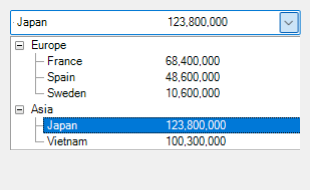
Each row becomes an item. The ColumnClass.DataMember property of each column of the list names the property (or data column) of the rows shown in the column's cells, and ColumnClass.DataFormat defines a .NET format string for the values, such as "d", "C2" or "N0". When no column names a member, the list shows the SftBox.DisplayMember member in its first column.
The SftBox.DisplayMember property names the member whose text the edit field shows for an item, and the SftBox.ValueMember property the member that is the item's value. The SftBox.SelectedValue property returns the value of the selected item, and setting it selects the item with that value. SftBox.SelectedDataItem returns and sets the row of the selected item.
The SelectedValue property can be bound to a property of another object, which makes the combo box a lookup field for that property: the combo box shows the item whose value the property holds, and choosing another item writes its value back.
C#
sftBox1.DisplayMember = "Name";
sftBox1.ValueMember = "Id";
sftBox1.DataSource = countries;   // a DataTable with the columns Id and Name
sftBox1.DataBindings.Add("SelectedValue", order, "CountryId", false, DataSourceUpdateMode.OnPropertyChanged);
VB
SftBox1.DisplayMember = "Name"
SftBox1.ValueMember = "Id"
SftBox1.DataSource = countries   ' a DataTable with the columns Id and Name
SftBox1.DataBindings.Add("SelectedValue", order, "CountryId", False, DataSourceUpdateMode.OnPropertyChanged)
A value that matches no row leaves the combo box without a selection. A value set before the data source is connected is applied when it is.
Without further settings, all rows are top-level items. A hierarchy is defined by the list, in one of two ways:
The list follows the changes a data source reports (IBindingList, such as a BindingList, a DataView or a BindingSource): rows that are added, removed or changed add, remove or update their items, and a new list rebuilds all items. Expanded items stay expanded and the selected item stays selected; the edit field keeps text the user typed. The current row of the data source (the Position of its CurrencyManager) follows the item the user chooses.
The ListClass.ItemDataBound event of the list occurs after an item has been created or updated from its row. It is the place to set images, check boxes, colors and fonts of the item and its cells.
While a data source is set, the items belong to it: the application cannot add, remove or sort items (the data source can be sorted instead), and changes made to cells are not written back to the data source.

 On
 Off