

While the user types in the edit field, the combo box searches the list. The SftBox.SearchMode property defines how (see SearchModeEnum):
| Search Mode | Description |
|---|---|
| SearchModeEnum.Prefix (default) | The first item whose text starts with the typed text is selected in the list. |
| SearchModeEnum.Exact | The first item whose text equals the typed text is selected in the list. |
| SearchModeEnum.AutoComplete | The first item whose text starts with the typed text is selected in the list, and the rest of its text is added to the typed text and selected, so typing continues to replace it. |
| SearchModeEnum.Contains | The first item whose text contains the typed text is selected in the list. |
| SearchModeEnum.Filter | The list shows only the items whose text contains the typed text, and their parent items, and the first of them is selected. |
| SearchModeEnum.Manual | The application searches the list itself, in response to the SftBox.EditTextChanged event. |
| SearchModeEnum.None | Typing doesn't search the list. |

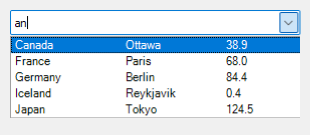
The comparisons ignore case and use the current culture. The SftBox.SearchColumn property defines the column that is searched, and the SftBox.SearchVisibleOnly property whether the children of collapsed items are skipped. The item found is selected in the list; it becomes the combo box's selection when the user chooses it (see Selection and Text). With the SftBox.DropOnInput property set, typing opens the dropdown.
The Filter search mode takes the items that don't match out of the list and puts them back in their places when the filter ends: when the text is cleared, when the user presses Escape with the dropdown closed, when an item is chosen, and when the application adds, removes or sorts items or changes the data source. Parent items expanded to show matching items are collapsed again.
A DropDownList combo box has no edit field. Typing selects the item whose text starts with the characters typed within a second.
The SftBox.FindItem method searches the list the same ways, for example to find an item before selecting it.

 On
 Off