

The list of a combo box is a hierarchical list (ListClass), returned by the SftBox.List property. It offers multiple columns with column headers and footers, row headers with optional row numbers, a hierarchy with expand/collapse buttons, tree lines and item images, cells with text, images, buttons, check boxes, radio buttons and progress bars, grid lines, tooltips, sorting, colors and fonts.
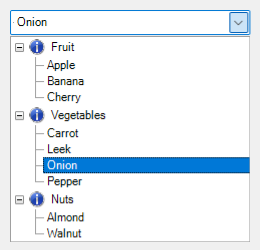
The SftBox.Items property returns the list's top-level items (the same as List.ItemCollection) and the SftBox.Columns property its columns (the same as List.Columns). Items are added like this:
C#
sftBox1.Columns.Count = 2;
ItemClass fruit = sftBox1.Items.Add(new string[] { "Fruit", "" });
fruit.Add(new string[] { "Apple", "Red" });
fruit.Add(new string[] { "Banana", "Yellow" });
sftBox1.Items.Add(new string[] { "Bread", "" });
sftBox1.List.ShowExpandCollapseButtons = ShowExpandCollapseButtonsEnum.AllLevels;
VB
SftBox1.Columns.Count = 2
Dim fruit As ItemClass = SftBox1.Items.Add(New String() {"Fruit", ""})
fruit.Add(New String() {"Apple", "Red"})
fruit.Add(New String() {"Banana", "Yellow"})
SftBox1.Items.Add(New String() {"Bread", ""})
SftBox1.List.ShowExpandCollapseButtons = ShowExpandCollapseButtonsEnum.AllLevels
The list's Initializing property (SftBox.List.Initializing) speeds up adding many items. A list can also be filled from a data source (see Data Binding) or with the installed fonts (see Font Lists).
A combo box starts its list with the settings a dropdown list usually has: no column headers, footers or row headers, no grid lines, no tree lines between top-level items, scroll bars only when needed, and the selection drawn in the highlight color. All of them can be changed through the SftBox.List property or the property pages. The list always uses single item selection, never takes the input focus from the combo box, and follows the combo box's font until a font of its own is set.
The SftBox.DisplayColumn property defines the column whose text an item shows in the edit field, and the SftBox.SearchColumn property the column searched while the user types.
The pages of this chapter describe the parts of the list. All classes, properties, methods and events of the list are listed in the reference, starting with the ListClass class.

 On
 Off