

An SftBox control is a combo box: a field that shows the selected item or the text the user typed, and a list to choose from. The list, a hierarchical list with columns, is returned by the SftBox.List property (see The List).
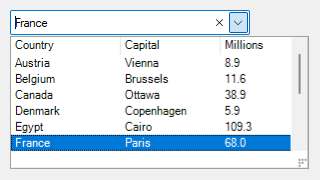
| Component | Description |
|---|---|
| Edit field | The text of the selected item, which the user can edit and search with in the DropDown and Simple styles. A DropDownList combo box shows the selected item instead, as the list shows it or as text only (see Selection and Text). |
| Clear button | Shown while the combo box has a selection or text when the SftBox.ShowClearButton property is set. It clears the selection and the text. |
| Dropdown button | Opens and closes the dropdown. The SftBox.ButtonImage and SftBox.ButtonImageDropped properties replace its arrow with images. |
| Dropdown | The list, shown below or above the field (see The Dropdown). A Simple style combo box shows the list below the field all the time. |
| List | The items to choose from, in one or more columns, with optional column headers and footers, row headers and a hierarchy (see The List). |
| Size grip | Shown in the corner of the dropdown when the SftBox.DropDownResizable property is set. The user drags it to resize the dropdown. |
The style of the combo box is defined by the SftBox.Style property (see Styles). The border is defined by the SftBox.BorderStyle property (see Appearance). The SftBox.FieldBounds and SftBox.ButtonBounds properties return the locations of the edit field and the dropdown button.

 On
 Off