

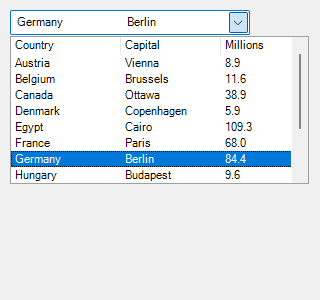
A DropDown or DropDownList combo box shows its list in a dropdown. The user opens it with the dropdown button, F4, Alt+Down or Alt+Up, and the application with the SftBox.OpenDropDown method or the SftBox.DroppedDown property. The dropdown never takes the input focus from the combo box: the keys the user types go to the edit field and move in the list (see Keyboard Interface).
| Property | Description |
|---|---|
| SftBox.DropDownItems | The number of items the dropdown shows without scrolling (default 8). |
| SftBox.DropDownWidthMode | The width of the dropdown: the width of the control (DropDownWidthModeEnum.Control, the default), the width defined by the SftBox.DropDownWidth property (DropDownWidthModeEnum.Fixed), or wide enough to show all columns completely, and at least as wide as the control (DropDownWidthModeEnum.Optimal). |
| SftBox.DropDownAlignment | The edge of the control the dropdown is aligned with, left (default) or right, swapped for right-to-left controls. |
| SftBox.DropDownPosition | Below (default) or above the control. The dropdown uses the other side if there is more room there, and always stays within the monitor. |
| SftBox.DropDownResizable | Adds a size grip to the dropdown. The size the user chooses is kept in the SftBox.DropDownSize property, and the SftBox.DropDownResized event occurs. |
| Property | Description |
|---|---|
| SftBox.DropOnFocus | The dropdown opens when the control receives the input focus. A click into the field opens it when the mouse button is released. |
| SftBox.DropOnInput | The dropdown opens when the user types in the edit field. |
| SftBox.ExtendedUI | The Down Arrow key opens the dropdown, and F4 is ignored, instead of Down Arrow selecting the next item. |
| SftBox.HotTrackSelection | The item under the mouse is selected in the open dropdown (default). It becomes the combo box's selection only when it is clicked or chosen with Enter. |
| SftBox.PassClosingClick | A click outside the dropdown that closes it also reaches the window under the mouse. By default, such a click only closes the dropdown, as in Windows combo boxes. |
The user chooses an item with a click or with Enter, which closes the dropdown. The user can also press the mouse button on the field, drag into the list and release it on an item. Escape, a click outside the dropdown and the SftBox.CloseDropDown method close the dropdown without changing the selection.
| Event | Occurs when |
|---|---|
| SftBox.DropDownOpening | Before the dropdown opens. Setting CancelEventArgs.Cancel keeps it closed. |
| SftBox.DropDownOpened | The dropdown has opened. |
| SftBox.DropDownClosed | The dropdown has closed. DropDownClosedEventArgs.Accepted reports whether an item was chosen. |
| SftBox.DropDownResized | The user has resized the dropdown. |

 On
 Off