

A combo box can list the fonts installed on the system, and the styles and sizes of a font family, without application code to collect them.
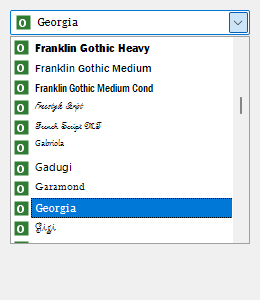
| Method | Description |
|---|---|
| SftBox.FillFontNames | Fills the list with the names of the installed font families. The FontListOptionsEnum options list only fixed pitch fonts (FontListOptionsEnum.FixedPitchOnly), show each name in its own font (FontListOptionsEnum.ShowInFont) and add an image that shows whether a font is a TrueType or an OpenType font (FontListOptionsEnum.ShowTypeImage). Font families without a regular, bold, italic or bold italic face are not listed. |
| SftBox.FillFontStyles | Fills the list with the styles a font family offers among Regular, Italic, Bold and Bold Italic. |
| SftBox.FillFontSizes | Fills the list with the sizes from 8 to 72 points that word processors offer. |
Each method clears the list first. The ItemClass.DataItem of each item is the FontFamily, the FontStyle or the size in points (a float), so the SftBox.SelectedValue property returns the selected font family, style or size, and setting it selects that item. The lists cannot be filled while a data source is bound (SftBox.DataSource property).
C#
sftBoxFont.FillFontNames(FontListOptionsEnum.ShowInFont | FontListOptionsEnum.ShowTypeImage);
sftBoxFont.SelectedValue = new FontFamily("Segoe UI");

private void sftBoxFont_SelectedValueChanged(object sender, EventArgs e) {
    FontFamily family = sftBoxFont.SelectedValue as FontFamily;
    if (family != null)
        sftBoxSize.FillFontSizes(family);
}
VB
SftBoxFont.FillFontNames(FontListOptionsEnum.ShowInFont Or FontListOptionsEnum.ShowTypeImage)
SftBoxFont.SelectedValue = New FontFamily("Segoe UI")

Private Sub SftBoxFont_SelectedValueChanged(ByVal sender As Object, ByVal e As EventArgs) Handles SftBoxFont.SelectedValueChanged
    Dim family As FontFamily = TryCast(SftBoxFont.SelectedValue, FontFamily)
    If family IsNot Nothing Then
        SftBoxSize.FillFontSizes(family)
    End If
End Sub

 On
 Off