

The list can show multiple columns (see ColumnsClass.Count). Each item has one cell in each column. The SftBox.Columns property returns the columns of the list.
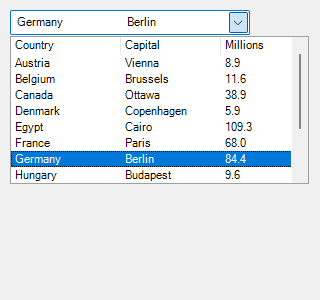
Each column has a defined width (see ColumnClass.Width). The last column can be defined as an open-ended column using the ColumnsClass.LastOpenended property; an open-ended last column shows the complete contents of its cells. ColumnsClass.MakeOptimal and ColumnClass.MakeOptimal size columns optimally in width.
With SftBox.DropDownWidthMode set to DropDownWidthModeEnum.Optimal, the dropdown is wide enough to show all columns completely. A DropDownList combo box shows all columns of the selected item in its field (see Styles).
For a list filled from a data source, the ColumnClass.DataMember property names the member each column shows (see Data Binding).
See Also List Components

 On
 Off