

Defines whether the calendar shows the current date.
Get
| C# | bool Boolean = object.ShowToday; |
| VB.NET | Boolean = object.ShowToday As Boolean |
| C++ | VARIANT_BOOL Boolean = object->ShowToday; VARIANT_BOOL Boolean = object->GetShowToday(); |
| C | HRESULT object->get_ShowToday(VARIANT_BOOL* Boolean); |
Put
| C# | bool object.ShowToday = Boolean; |
| VB.NET | object.ShowToday = Boolean As Boolean |
| C++ | VARIANT_BOOL object->ShowToday = Boolean; void object->PutShowToday(VARIANT_BOOL Boolean); |
| C | HRESULT object->put_ShowToday(VARIANT_BOOL Boolean); |
object
Boolean
Defines whether the calendar shows the current date.
| Boolean | Description |
|---|---|
| True | Today's date is displayed. |
| False | Today's date is not displayed. |
The ShowToday property defines whether the calendar shows the current date.
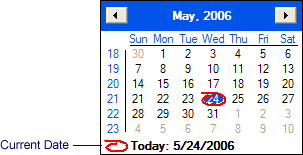
To circle today's date in the calendar display, the Calendar.CircleToday property is used.
    axSftMask1.MessageTitle = "Sample";
    axSftMask1.MessageEmpty = "Please enter a date";
    axSftMask1.MessageInvalid = "Please enter a valid date";
    axSftMask1.AutoSize = true;
    axSftMask1.Calendar.CircleToday = true;
    axSftMask1.Calendar.WeekNumbers = true;
    axSftMask1.Calendar.FirstDate = new DateTime(2000, 1, 1);
    axSftMask1.Calendar.LastDate = new DateTime(2020, 12, 31);
    axSftMask1.Calendar.ShowToday = true;
    axSftMask1.Caption.Text = "&Ship Date";
    axSftMask1.Caption.Alignment = SftMaskAlignConstants.alignSftMaskCenter;
    axSftMask1.Caption.Position = SftMaskPositionConstants.positionSftMaskTop;
    axSftMask1.Caption.BackColor = (uint) ColorTranslator.ToOle(SystemColors.Highlight);
    axSftMask1.Caption.ForeColor = (uint) ColorTranslator.ToOle(SystemColors.HighlightText);
    axSftMask1.Contents.DateTime = new DateTime(2007, 1, 1);
}
    AxSftMask1.MessageTitle = "Sample"
    AxSftMask1.MessageEmpty = "Please enter a date"
    AxSftMask1.MessageInvalid = "Please enter a valid date"
    AxSftMask1.AutoSize = True
    AxSftMask1.Calendar.CircleToday = True
    AxSftMask1.Calendar.WeekNumbers = True
    AxSftMask1.Calendar.FirstDate = #1/1/2000#
    AxSftMask1.Calendar.LastDate = #12/31/2020#
    AxSftMask1.Calendar.ShowToday = True
    AxSftMask1.Caption.Text = "&Ship Date"
    AxSftMask1.Caption.Alignment = SftMaskAlignConstants.alignSftMaskCenter
    AxSftMask1.Caption.Position = SftMaskPositionConstants.positionSftMaskTop
    AxSftMask1.Caption.BackColor = Convert.ToUInt32(ColorTranslator.ToOle(SystemColors.Highlight) And &HFFFFFFFF&)
    AxSftMask1.Caption.ForeColor = Convert.ToUInt32(ColorTranslator.ToOle(SystemColors.HighlightText) And &HFFFFFFFF&)
    AxSftMask1.Contents.DateTime = #1/1/2007#
End Sub
    m_pMask1->AutoSize = VARIANT_TRUE;
    m_pMask1->Calendar->CircleToday = VARIANT_TRUE;
    m_pMask1->Calendar->WeekNumbers = VARIANT_TRUE;

    COleDateTime first(2000, 1, 1, 0,0,0);
    m_pMask1->Calendar->FirstDate = first;
    COleDateTime last(2020, 12, 31, 0,0,0);
    m_pMask1->Calendar->LastDate = last;
    m_pMask1->Calendar->ShowToday = VARIANT_TRUE;
    m_pMask1->Caption->Text = _T("&Ship Date");
    m_pMask1->Caption->Alignment = alignSftMaskCenter;
    m_pMask1->Caption->Position = positionSftMaskTop;
    m_pMask1->Caption->BackColor = COLOR_HIGHLIGHT | 0x80000000L;
    m_pMask1->Caption->ForeColor = COLOR_HIGHLIGHTTEXT | 0x80000000L;

    m_pMask1->Contents->DateTime = COleDateTime(2007, 1, 1, 0,0,0);
See Also SftMaskCalendar Object | Object Hierarchy

 On
 Off