Popup Calculator
The popup calculator is automatically available for numeric input if the edit mask (lpszMask field of the SFTMASK_CONTROL structure) has been defined using the C subtoken (see Edit Masks).
While the user enters numeric input in a numeric field, the popup calculator can be accessed by typing the characters +, -, * or / to start an arithmetic operation. The NM_SFTMASK_INVOKINGCALCULATOR notification is sent when the popup calculator is about to be displayed. The current value found in the numeric field is combined with the next number entered in the popup calculator's input area using the arithmetic operator typed.
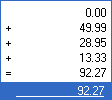
While the popup calculator is displayed, pressing the +, -, * or / characters will calculate the new result and the next number can be entered. The popup calculator works identically to a "real-world" calculator and displays the previous results and the arithmetic operators.
Pressing C will clear the current number entered.
Pressing = will display the new total and the popup calculator remains active.
The user can press the Return key to calculate the new total and close the calculator. The new total is then entered into the masked edit control. If the total exceeds the capacity of the masked edit control numeric field, the popup calculator is not closed.
Pressing the Escape key will close the popup calculator, preserving the original contents of the masked edit control. Using the mouse and clicking outside of the popup calculator has the same effect as pressing the Escape key.
As the user types characters, the NM_SFTMASK_CALCULATORKEYPRESS and NM_SFTMASK_CALCULATORKEY notifications are sent to the parent window.
The number of displayed fractional digits can be defined using the nFracDigits field.
The maximum number of lines of intermediate results displayed by the popup calculator can be defined using the nViewCalcLines field. The number of lines stored for display purposes is defined using the nCalcLines field. If nViewCalcLines allows for fewer lines to be displayed than are stored (nCalcLines), a vertical scrollbar is shown, which is used to scroll through the list of calculator entries.
The background and foreground colors of the popup calculator can be defined using the calcColorBg, calcColorFg, calcColorSelectBg, calcColorSelectFg, calcColorFrame, calcColorTotalBg and calcColorTotalFg fields.
The Rollup function can be used to close the popup calendar, popup calculator and autocomplete window.
The popup calculator follows the control's dark mode and high contrast rendering.
See Also Edit Masks | Popup Calendar | Notifications | SFTMASK_CONTROL



 On
On Off
Off