Built-In Caption
SftMask/DLL provides an easy to use built-in caption which is displayed at a user-definable position, relative to the edit area (see the captioniPosition field of the SFTMASK_CONTROL structure). The alignment of the caption can be defined both horizontally and vertically (using captioniAlignment and captioniVerticalAlignment). The text of the caption is defined using the lpszCaption field. The caption can be defined as transparent (using captionfTransparent), so the background of the enclosing dialog or window is used as background for the caption's text.
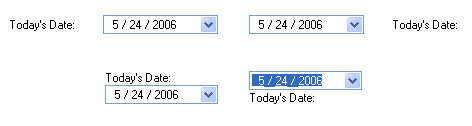
The caption can include an accelerator key. By using the & character in the lpszCaption field, the following character becomes an accelerator key. If the user types Alt plus the defined accelerator key, the masked edit control receives the input focus. For example, if lpszCaption is set to "Today's &Date", the displayed caption will read "Today's Date", i.e., the D is underlined. If the user types Alt+d, the masked edit control receives the input focus. To display an & character use "&&".
The caption uses the font defined using the captionFont field (or the control's font if none is set) and the colors defined using captionColorBg, captionColorFg and captionColorFgGrayed.
The caption can be hidden by setting the captionnSizePercent and captionnWidth fields to 0.
The size of the caption depends on the position of the caption as defined using the captioniPosition field and the fAutoSize and captionnSizePercent fields:
| Position | fAutoSize | captionnSizePercent | Description |
|---|
| SFTMASK_POSITIONLEFT | FALSE | 0-100 | The caption width is defined by the captionnSizePercent or captionnWidth fields. The width of the caption is the specified percentage of the overall control width. The edit area is displayed in the remaining area to the right of the caption. The height of the caption and the edit area is equivalent to the overall height of the control. |
| TRUE | 0-100 | The caption width is defined by the captionnSizePercent or captionnWidth fields. The width of the caption is the specified percentage of the overall control width. The edit area is displayed in the remaining area to the right of the caption. The height of the caption and the edit area is automatically determined based on the attributes of the caption and edit area, such as the caption font and the control's font. |
| SFTMASK_POSITIONRIGHT | FALSE | 0-100 | The caption width is defined by the captionnSizePercent or captionnWidth fields. The width of the caption is the specified percentage of the overall control width. The edit area is displayed in the remaining area to the left of the caption. The height of the caption and the edit area is equivalent to the overall height of the control. |
| TRUE | 0-100 | The caption width is defined by the captionnSizePercent or captionnWidth fields. The width of the caption is the specified percentage of the overall control width. The edit area is displayed in the remaining area to the left of the caption. The height of the caption and the edit area is automatically determined based on the attributes of the caption and edit area, such as the caption font and the control's font. |
| SFTMASK_POSITIONTOP | FALSE | 0-100 | The caption height is defined by the captionnSizePercent or captionnWidth fields. The height of the caption is the specified percentage of the overall control height. The edit area is displayed in the remaining area below the caption. The height of the edit area is automatically determined based on the attributes of the edit area, such as the control's font. The width of the caption and the edit area is equivalent to the overall width of the control. |
| TRUE | 0-100 | The captionnSizePercent and captionnWidth fields are ignored. The edit area is displayed below the caption. The height of the caption and the edit area is automatically determined based on the attributes of the caption and edit area, such as the caption font and the control's font. The width of the caption and the edit area is equivalent to the overall width of the control. |
| SFTMASK_POSITIONBOTTOM | FALSE | 0-100 | The caption height is defined by the captionnSizePercent or captionnWidth fields. The height of the caption is the specified percentage of the overall control height. The edit area is displayed in the remaining area above the caption. The height of the edit area is automatically determined based on the attributes of the edit area, such as the control's font. The width of the caption and the edit area is equivalent to the overall width of the control. |
| TRUE | 0-100 | The captionnSizePercent and captionnWidth fields are ignored. The edit area is displayed above the caption. The height of the caption and the edit area is automatically determined based on the attributes of the caption and edit area, such as the caption font and the control's font. The width of the caption and the edit area is equivalent to the overall width of the control. |
See Also Label | SFTMASK_POSITION Constants | SFTMASK_VERTALIGN Constants | SFTMASK_CONTROL



 On
On Off
Off