Error Image
The control supports an automatic error indicator in the form of an image next to the control, which provides visual feedback to the user that the data is required, invalid or missing.
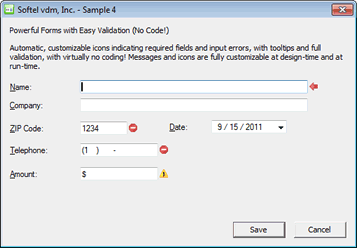
The ImageEmpty, ImageInvalid, ImageRequired, erroriPosition and erroriHandling fields of the SFTMASK_CONTROL structure are used to control the appearance and behavior of the error image. The images are defined using the SFT_PICTURE structure and support bitmaps, icons and GDI+ images (PNG, JPEG, etc.).
The ImageEmpty field defines the error image shown when the control's contents are empty (depending on the fAllowEmpty and fAllowEmptyWithoutMask fields). In addition, the lpszMsgErrorEmpty field defines the tooltip shown when the mouse cursor hovers over the error image.
The ImageInvalid field defines the error image shown when the control's contents are invalid (based on the defined edit mask or the NM_SFTMASK_CUSTOMVALIDATION notification). In addition, the lpszMsgErrorInvalid field defines the tooltip shown when the mouse cursor hovers over the error image.
The ImageRequired field defines the error image shown when data entry is required (depending on the fAllowEmpty and fAllowEmptyWithoutMask fields). In addition, the lpszMsgErrorRequired field defines the tooltip shown when the mouse cursor hovers over the error image.
The erroriPosition field defines the location of the error image, which can be located to the left or right of the input area.
The erroriHandling field defines whether the error image is updated immediately as the control contents change or once the IsValid or IsValidWithMsg function is called.
When per-monitor DPI image scaling is enabled (see SetImageScaling), the error images are scaled to match the monitor's DPI.
See Also Input Validation | SFTMASK_ERRORPOSITION Constants | SFTMASK_ERRORHANDLING Constants | SFTMASK_CONTROL



 On
On Off
Off