SftTree/OCX 8.0
The Windows tree control for data that has structure
The powerful hierarchical tree-grid for Windows — modernized. Multi-line, multi-column, fully hierarchical data displays that drop into any ActiveX container and now look and feel completely at home on modern Windows.
Supports Visual Studio 2019 - 2026, Windows 10 and newer versions, including Server editions.
Find out about all the new features in this release! Download the SftTree/OCX 8.0 demo (see Free 30 Day Trial on right side of this page) and evaluate the product for 30 days.
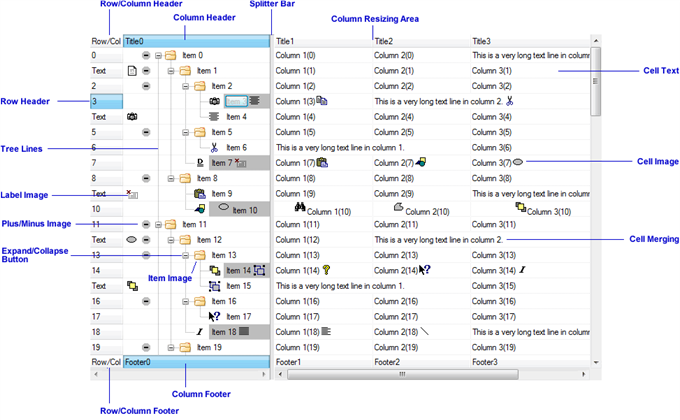
The above image shows the individual components that are available in a SftTree/OCX tree control. All components, except for the first column displaying an item's text, are optional. By turning all optional components off, the SftTree/OCX tree control can visually act as a simple list box.
For years, SftTree/OCX has been the go-to ActiveX control for developers who need more than a plain list or a flat grid — true hierarchical, multi-column displays with pixel-level control over every cell. Version 8.0 keeps everything you rely on and brings it fully up to date: automatic dark mode, per-monitor high-DPI scaling, and built-in accessibility — all while remaining virtually 100% upward compatible with your existing projects.
Built for modern Windows
Automatic Dark Mode. The control follows the Windows "Choose your mode" setting out of the box, switching between light and dark palettes as your users do — or lock it on with a single property. Your own color choices are always respected.
Per-Monitor v2 High-DPI. Row heights, grid lines, headers, control glyphs, and — at your option — every image and pixel dimension scale crisply as windows move between monitors of different DPI. No more blurry controls on high-resolution displays.
Accessibility, built in. Full UI Automation support lets Narrator, NVDA, JAWS, and other assistive technologies read the tree's structure, column and row headers, selection, and expand/collapse state — and a split tree presents as a single, unified data grid. The new Announce method pushes short status updates ("3 rows added," "Filter cleared," "Saved") straight to the screen reader.
Windows High Contrast. When a user enables a high-contrast theme, SftTree/OCX honors it automatically — the accessibility-correct behavior Microsoft's guidelines require.
Everything a data display needs
- Hierarchical or flat — unlimited levels, single or multiple roots, and expand/collapse buttons, plus a fast virtual mode for very large flat lists.
- Rich columns — resizable, reorderable columns with header and footer buttons, built-in sort indicators, individual colors, and selectable alignment.
- Cells with character — per-cell fonts, foreground and background colors, gradient fills, images, in-cell progress bars, cell merging, and word-wrapped multi-line text.
- In-place editing — edit cells with standard Windows controls, or embed any control you like directly in a cell with content windows.
- Interaction that feels right — built-in or OLE drag & drop with automatic scrolling, flyby highlighting, tooltips and scroll tips, a resize grip, and a splitter bar for side-by-side panes.
Works everywhere you build
Drop SftTree/OCX 8.0 into Visual Studio (.NET), Visual Basic 6, Visual C++ (MFC), Microsoft Access, or any other ActiveX/OLE container. It ships as both 32-bit and 64-bit controls, so "Any CPU" .NET applications are covered. Upgrading from an earlier release takes just minutes — 8.0 is virtually 100% upward compatible and can coexist with older versions on the same machine.
The tree control you know. Ready for what's next.

 On
On Off
Off